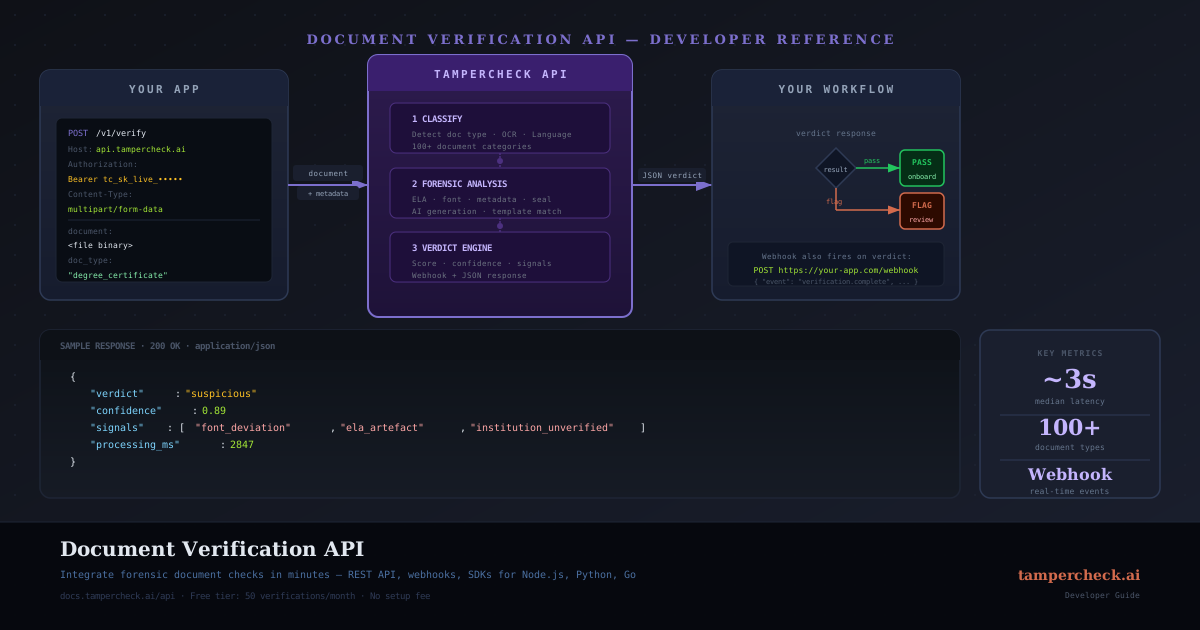
Document verification is a solved problem at the API level. You submit a document, get back a structured JSON verdict in ~3 seconds, and route your workflow based on the result. This guide covers everything you need to integrate from scratch — or migrate from a manual review queue.
Prerequisites
- An API key from your TamperCheck account (Settings → API Keys)
- A document to submit: PDF, JPEG, or PNG, up to 20 MB
- Your document type (optional — the API auto-classifies if omitted)
Authentication
All requests use bearer token authentication. Include your API key in the Authorization header:
Authorization: Bearer tc_live_your_key_hereUse environment variables — never commit API keys to source control.
# .env
TAMPERCHECK_API_KEY=tc_live_your_key_here
Submitting a Document
Base64 Encoding
The simplest integration sends the document as a base64-encoded string in the request body:
import base64
import httpx
import os

def verify_document(file_path: str, doc_type: str = None) -> dict:
    with open(file_path, "rb") as f:
        encoded = base64.b64encode(f.read()).decode()

    payload = {
        "document": encoded,
        "document_format": "pdf",  # "pdf", "jpeg", or "png"
    }
    if doc_type:
        payload["document_type"] = doc_type

    response = httpx.post(
        "https://tampercheck.ai/api/v1/analyse",
        headers={"Authorization": f"Bearer {os.environ['TAMPERCHECK_API_KEY']}"},
        json=payload,
        timeout=30,
    )
    response.raise_for_status()
    return response.json()
Supported Document Types
If you know the document type in advance, specifying it improves accuracy and speeds up analysis. Accepted values:
| Value | Document |
|---|---|
bank_statement | Bank statements |
payslip | Payslips / pay stubs |
passport | Passports |
drivers_licence | Driver's licences |
national_id | National identity cards |
utility_bill | Utility bills |
invoice | Invoices |
tax_return | Tax returns |
vehicle_registration | Vehicle registration certificates |
professional_license | Professional licences |
Omit document_type entirely to use auto-classification.
Parsing the Response
A successful analysis returns HTTP 200 with a structured JSON body:
{
  "job_id": "job_abc123",
  "status": "completed",
  "document_type": "bank_statement",
  "verdict": "suspicious",
  "confidence": 0.87,
  "signals": [
    {
      "check": "balance_arithmetic",
      "result": "pass",
      "severity": null
    },
    {
      "check": "ela_analysis",
      "result": "elevated_artefacts",
      "severity": "high",
      "detail": "Compression anomalies detected in balance field region."
    },
    {
      "check": "font_metrics",
      "result": "outlier_detected",
      "severity": "medium",
      "detail": "Closing balance character spacing is a statistical outlier."
    },
    {
      "check": "metadata_consistency",
      "result": "pass",
      "severity": null
    }
  ],
  "summary": "ELA analysis found compression artefacts consistent with value replacement in the closing balance region. Font metrics reinforce the signal. Manual review recommended before proceeding.",
  "processing_time_ms": 2840
}
Verdict Values
| Verdict | Meaning | Recommended Action |
|---|---|---|
clear | All checks passed | Auto-approve |
suspicious | One or more elevated signals | Route to human review |
likely_tampered | Multiple high-confidence anomalies | Escalate / reject |
inconclusive | Insufficient data for verdict | Request resubmission |
Working with Signals
Each signal object contains:
check: the forensic check that was runresult:"pass"or a specific finding identifierseverity:null,"low","medium", or"high"(null for passing checks)detail: human-readable explanation (only present on non-pass results)
def route_document(result: dict) -> str:
    verdict = result["verdict"]
    if verdict == "clear":
        return "approve"
    elif verdict == "suspicious":
        return "manual_review"
    elif verdict == "likely_tampered":
        return "reject"
    else:
        return "request_resubmission"

def get_high_severity_signals(result: dict) -> list:
    return [
        s for s in result["signals"]
        if s.get("severity") == "high"
    ]
Asynchronous Workflow with Webhooks
For high-volume workflows, use the asynchronous submit-and-poll or webhook pattern. Submit the document, get a job_id, and receive the result via webhook when analysis completes:
# 1. Submit asynchronously
response = httpx.post(
    "https://tampercheck.ai/api/v1/analyse",
    headers={"Authorization": f"Bearer {os.environ['TAMPERCHECK_API_KEY']}"},
    json={
        "document": encoded,
        "document_format": "pdf",
        "webhook_url": "https://yourapp.com/webhooks/tampercheck",
    },
)
job_id = response.json()["job_id"]  # store this

# 2. Receive the webhook payload (same structure as synchronous response)
# POST https://yourapp.com/webhooks/tampercheck
# Body: { "job_id": "...", "status": "completed", "verdict": "...", ... }
Webhook Security
Verify that webhooks originate from TamperCheck by checking the X-TamperCheck-Signature header:
import hmac
import hashlib

def verify_webhook(payload: bytes, signature: str, secret: str) -> bool:
    expected = hmac.new(
        secret.encode(),
        payload,
        hashlib.sha256,
    ).hexdigest()
    return hmac.compare_digest(expected, signature)
Always verify webhook signatures before processing the payload. Unverified webhooks can be forged to trigger approval of fraudulent documents.
Error Handling
The API returns standard HTTP status codes:
| Status | Meaning | Handling |
|---|---|---|
200 | Success | Parse and route |
400 | Invalid request | Fix payload (check error.detail) |
401 | Invalid API key | Check key and permissions |
413 | Document too large | Compress or split document |
422 | Document unreadable | Request resubmission |
429 | Rate limit exceeded | Exponential backoff |
503 | Service unavailable | Retry with backoff |
import time

def verify_with_retry(file_path: str, max_retries: int = 3) -> dict:
    for attempt in range(max_retries):
        try:
            return verify_document(file_path)
        except httpx.HTTPStatusError as e:
            if e.response.status_code == 429:
                time.sleep(2 ** attempt)  # exponential backoff
            elif e.response.status_code >= 500:
                time.sleep(2 ** attempt)
            else:
                raise  # don't retry client errors
    raise RuntimeError("Max retries exceeded")
TypeScript / Node.js Example
import fs from "fs";

interface VerificationResult {
  job_id: string;
  verdict: "clear" | "suspicious" | "likely_tampered" | "inconclusive";
  confidence: number;
  signals: Array<{
    check: string;
    result: string;
    severity: "low" | "medium" | "high" | null;
    detail?: string;
  }>;
  summary: string;
}

async function verifyDocument(filePath: string): Promise<VerificationResult> {
  const document = fs.readFileSync(filePath).toString("base64");

  const response = await fetch("https://tampercheck.ai/api/v1/analyse", {
    method: "POST",
    headers: {
      Authorization: `Bearer ${process.env.TAMPERCHECK_API_KEY}`,
      "Content-Type": "application/json",
    },
    body: JSON.stringify({ document, document_format: "pdf" }),
  });

  if (!response.ok) {
    const error = await response.json();
    throw new Error(`API error ${response.status}: ${error.detail}`);
  }

  return response.json();
}
Get your API key
Start with $5 in free credits — no contract, no minimum commitment. Integrate in under an hour.
Start free →FAQ
- What's the rate limit for the document verification API?
Default rate limits are 60 requests per minute per API key. Contact support to discuss higher limits for production workflows.
- Can I use my own AI provider key with the API?
Yes: TamperCheck supports BYOK (bring your own key) for OpenAI, Anthropic, Google, and Azure. Connect your provider credentials in Settings → AI Providers. New accounts include $5 in trial credits to get started without a provider key. For architecture guidance on building a full BYOK pipeline, including fallback routing, model selection, cost tiering, and compliance logging, see the AI Document Verification Pipeline with BYOK guide.
- Is document data stored after analysis?
By default, document content is processed in memory and not persisted beyond the analysis job. Job metadata (verdict, signals, timestamps) is retained for audit purposes. See the Privacy Policy for full data handling details.
- What file formats are supported?
PDF, JPEG, and PNG. Multi-page PDFs are supported. Scanned documents and digital PDFs are both accepted; the AI adjusts its analysis approach based on detected document origin.
- What forensic checks does the API actually run?
The API runs up to 10 independent forensic signals depending on document type — including ELA, font metrics, arithmetic integrity, metadata analysis, MRZ validation, template matching, and AI generation detection. For a plain-English explanation of each check and what fraud it catches, see How AI Agents Detect Forged Documents and the Complete Guide to Document Tampering and Fraud.
- Which industries use document verification APIs?
The primary use cases are KYC and financial onboarding, lending (mortgage and personal credit), insurance claims processing, rental application screening, and employment credential verification. See dedicated guides for each: KYC automation, insurance claims, rental applications, and HR credential checks.