Most document verification platforms operate as black boxes: you submit a document, pay a per-check fee, and receive a verdict. The AI model behind the verdict, the cost per inference, and where your document data is processed are opaque.
Bring-your-own-key (BYOK) changes this. You connect your own API credentials from your preferred AI provider (OpenAI, Anthropic, Google, or Azure), and the document verification platform routes its LLM-based analysis through your account. You get itemised inference costs, data processed under your provider agreement, and no markup on AI model usage.
This guide covers how to architect a production-grade BYOK document verification pipeline.
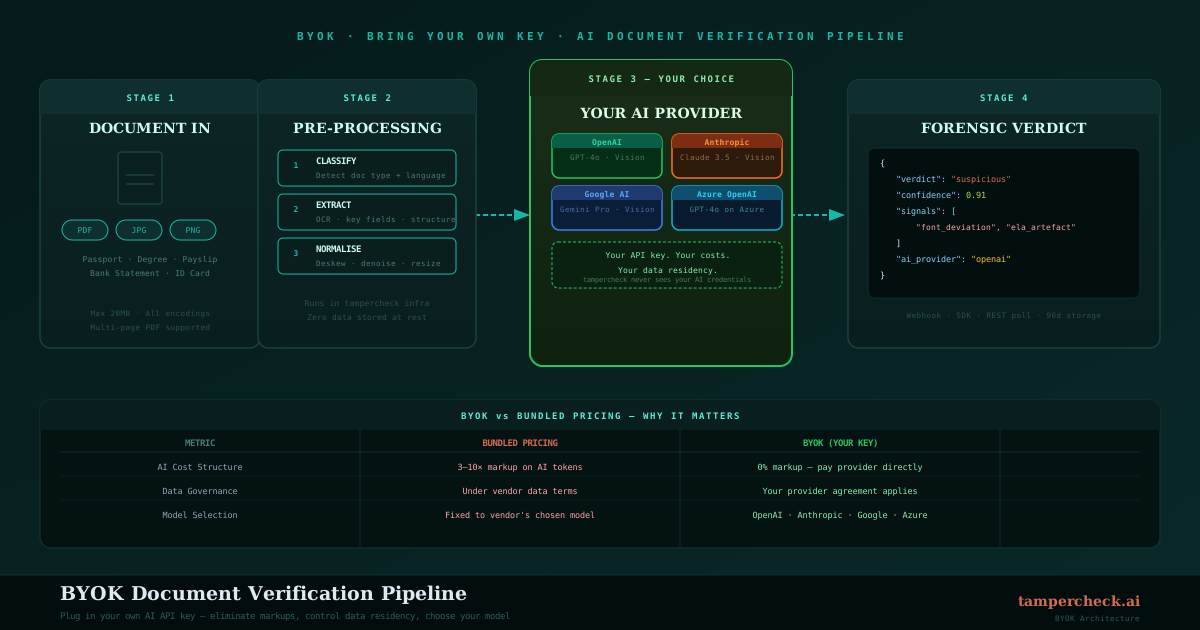
Why BYOK Matters for Document Verification
Cost Transparency
Document verification platforms that bundle AI inference into their per-check pricing typically mark up inference costs 3–10x. At scale (50,000 checks per month), this becomes material. BYOK routes inference directly through your provider account, so you pay your negotiated provider rates without markup.
Data Governance
In regulated industries (financial services, healthcare, legal), the question "where does my document data go?" has compliance implications. With BYOK, document content sent to the LLM layer travels under your provider agreement, data processing addendum, and regional data residency settings, not the verification platform's. You control the data governance chain end-to-end.
Provider Flexibility
AI model capabilities evolve rapidly. Being locked into a single provider's model means your verification quality is fixed until the platform upgrades. With BYOK, you can point to a newer model the moment it's released, and test model performance differences directly.
BYOK is particularly valuable for healthcare and financial services customers who need to route data through a Business Associate Agreement (BAA) or a Data Processing Agreement (DPA) with their specific AI provider.
Architecture Overview
A BYOK document verification pipeline has four layers:
Document Input
    ↓
Pre-processing (PDF extraction, image normalisation)
    ↓
Forensic Analysis (computer vision, arithmetic, metadata) — platform-managed
    ↓
LLM Semantic Analysis (your provider key) — BYOK
    ↓
Verdict Assembly and Response
The BYOK applies specifically to the LLM layer: the semantic analysis that reasons about document content, checks plausibility, and combines forensic signals into a plain-English verdict. The upstream forensic checks (ELA, font metrics, arithmetic) run on the platform's infrastructure and don't consume your provider credits.
Provider Configuration
Setting Up BYOK in TamperCheck
Navigate to Settings → AI Providers and add your provider credentials:
{
  "provider": "openai",
  "api_key": "sk-...",
  "model": "gpt-4o",
  "base_url": null
}
For Azure OpenAI, specify the deployment endpoint:
{
  "provider": "azure",
  "api_key": "your-azure-key",
  "base_url": "https://your-deployment.openai.azure.com",
  "deployment_name": "gpt-4o",
  "api_version": "2024-02-01"
}
For Anthropic:
{
  "provider": "anthropic",
  "api_key": "sk-ant-...",
  "model": "claude-sonnet-4-6"
}
Credentials are stored encrypted at rest. They're decrypted only at the point of inference and are never logged or stored in plaintext.
Fallback Configuration
Production pipelines should configure a fallback provider in case the primary provider is unavailable:
{
  "primary": {
    "provider": "anthropic",
    "api_key": "sk-ant-...",
    "model": "claude-sonnet-4-6"
  },
  "fallback": {
    "provider": "openai",
    "api_key": "sk-...",
    "model": "gpt-4o-mini"
  }
}
When the primary provider returns a 5xx error or exceeds a timeout threshold, the pipeline automatically retries the LLM step via the fallback, returning a slightly lower-confidence verdict but avoiding a hard failure.
Model Selection for Document Verification
Not all models perform equally on document forensic tasks. Key considerations:
Context Window
Bank statement analysis requires reasoning over potentially hundreds of transaction rows. Choose models with at least 32k context to handle multi-page financial documents without truncation:
| Provider | Recommended Model | Context |
|---|---|---|
| Anthropic | claude-sonnet-4-6 | 200k |
| OpenAI | gpt-4o | 128k |
| gemini-1.5-pro | 1M | |
| Azure | gpt-4o (East US 2) | 128k |
Vision Capability
If you're routing image-based documents (photographed passports, scanned bank statements) through the LLM layer, your model must support vision input. All recommended models above support multimodal input.
Latency
Semantic analysis should add no more than 2–3 seconds to the total pipeline latency. Test your chosen model's p95 latency under load before committing to it in production.
Cost Optimisation
Tiered Analysis
Not every document needs the full LLM semantic layer. If forensic checks (ELA, arithmetic, metadata) return a high-confidence pass, the LLM layer can be skipped, saving inference costs on documents that clearly don't need it:
def should_run_llm_analysis(forensic_result: dict) -> bool:
    """Skip LLM for documents that clearly pass all forensic checks."""
    high_confidence_pass = (
        forensic_result["confidence"] > 0.95
        and all(s["result"] == "pass" for s in forensic_result["signals"])
    )
    return not high_confidence_pass
In practice, 40–60% of submitted documents pass all forensic checks cleanly; these can skip the LLM layer entirely, reducing your provider inference costs by roughly half.
Model Tiering
Use a fast, cheap model for initial triage and a more capable model for ambiguous cases:
def select_model(forensic_confidence: float) -> str:
    if forensic_confidence > 0.8:
        return "gpt-4o-mini"  # cheap, fast for clear cases
    else:
        return "gpt-4o"  # full capability for ambiguous cases
Compliance and Audit Logging
What to Log
Every document verification job should produce an immutable audit record:
{
  "job_id": "job_abc123",
  "timestamp": "2026-04-09T10:23:11Z",
  "document_type": "bank_statement",
  "provider_used": "anthropic",
  "model_used": "claude-sonnet-4-6",
  "forensic_signals": [...],
  "verdict": "suspicious",
  "confidence": 0.87,
  "human_review_required": true,
  "reviewer_id": null,
  "final_decision": null
}
The provider_used and model_used fields are critical for compliance teams who need to demonstrate which AI model was involved in each decision.
Data Retention
Configure your provider account's data retention policy before going live:
- OpenAI: API requests are not used for training by default; zero data retention available with Enterprise
- Anthropic: API data is not used for training; data retention options available
- Azure OpenAI: full data residency and processing under your Azure agreement
- Google: review Vertex AI data processing terms for your use case
In financial services and healthcare, confirm with your compliance team that your chosen provider's data processing terms satisfy your regulatory obligations before processing production documents.
Monitoring Your Pipeline
Track these metrics in your observability stack:
- p50/p95/p99 latency: breakdown between forensic and LLM layers
- Provider error rate: 4xx and 5xx rates by provider
- Verdict distribution: ratio of clear / suspicious / likely_tampered over time (sudden shifts indicate either fraud wave or model change)
- Fallback activation rate: frequency of primary-provider failures
- LLM skip rate: % of documents that passed without LLM analysis
Connect your AI provider key
Set up BYOK in minutes, or start with $5 in free credits and add your own key when you're ready.
Start free →FAQ
- Does BYOK affect the forensic analysis quality?
BYOK applies only to the LLM semantic analysis layer. The upstream forensic checks (ELA, arithmetic, metadata, font metrics) run on TamperCheck's infrastructure and are unaffected by your provider configuration.
- Can I use a self-hosted or private model with BYOK?
Yes, if your provider exposes an OpenAI-compatible API endpoint (e.g., via Azure OpenAI, Ollama with an OpenAI-compatible server, or a private Claude deployment). Set the
base_urlto your endpoint and the platform will route requests accordingly.- What happens if I don't configure a BYOK key?
New accounts include $5 in trial credits that cover analysis through TamperCheck's managed provider configuration. Once trial credits are exhausted, either add a BYOK provider key or top up your wallet to continue using managed provider access.
- Where can I learn about what the forensic analysis layer actually checks?
The BYOK and architecture content here focuses on the pipeline design. For the forensic signal detail (what ELA, font metrics, arithmetic, and metadata analysis actually find), see the Complete Guide to Document Tampering and Fraud and the AI Agent Document Fraud Detection explainer.
- What document types can I verify through this pipeline?
All 100+ supported document types: passports, bank statements, payslips, invoices, credentials, utility bills, and more. See individual guides for each: bank statements, payslips, passports and IDs, insurance claims. For the full API request/response structure, see the Document Verification API Developer Guide.