A couple of years ago, spotting an AI-generated image was almost a party game: count the fingers, read the text on the sign, check if the earrings match. Today's image generators have gotten a lot better at all of those things individually.
What they still can't do is get everything right at the same time, on every part of the image, all at once. That's the gap that still makes fakes detectable in 2026 - just not by eyeballing it anymore.
Why "just look at it closely" doesn't work anymore
Most of the simple deepfake-spotting advice from a couple of years ago has aged badly. Newer AI tools render hands correctly most of the time, write legible text, and no longer give every face that overly smooth, plastic look. Face-swapping apps now blend the edges automatically so there's no obvious seam to spot.
That doesn't mean fakes are undetectable - it means the obvious tells are gone, and you need to check several different things at once instead of looking for one dead giveaway. A photo can pass on lighting and still fail on texture. It can have perfect text and still fail on the small details around a swapped face. Catching it reliably means checking everything together, not picking one trick and hoping it still works.
The 7 things worth checking
Here's what we actually look for - in plain language, with the kind of example you'd recognize if you saw it.
1. Body details that don't quite add up
The classic one: extra or missing fingers, eyes that don't quite match each other, teeth that blur together oddly. Worth noting - real people with a missing finger, a scar, or an unusual feature will sometimes trip this on a completely real photo. So this is one clue among several, never the whole answer on its own.
2. A texture or "finish" that feels artificial
Skin that looks airbrushed with no pores, a glossy "movie poster" quality, or parts of the image that look sharper or softer than they should compared to the rest. Think of stock photos that look "too perfect" - that's the same instinct, just measured rather than guessed at.
3. Text and objects that don't hold up close
Writing on a sign, a label, or a document inside the photo that looks fine at a glance but turns into nonsense the moment you read it properly. Or an object that's been drawn slightly wrong - a door handle attached to nothing, a watch with the wrong number of hands. AI image tools are still surprisingly bad at small, functional details like this.
4. Lighting and reflections that don't agree with each other
Shadows pointing in different directions for different objects in the same scene. A reflection in a mirror or a pair of glasses that doesn't show what it should be showing. Getting a whole scene's lighting physically consistent is one of the hardest things for an image generator to do, because it has to "understand" a 3D space rather than just paint a convincing 2D picture.
5. A scene that's technically fine but just feels off
Clothing or technology that doesn't match the era the photo is supposed to be from. People or props together in a way that wouldn't really happen. This one is softer and rarely decisive by itself, but it adds useful context alongside everything else.
6. What's missing behind the scenes
A real photo from a real camera carries a small amount of invisible information about how it was taken. AI-generated images usually don't, or carry different traces depending on which tool made them. This is something we can check without even needing to look hard at the picture itself, and we keep some of the specifics behind this check private on purpose - it's the kind of thing that's only useful as a forensic signal if it isn't widely known exactly how it's measured.
7. The face doesn't quite belong to the rest of the photo
This is the giveaway for a face-swap specifically - a real photo where someone's face has been digitally swapped in. The tell is usually around the edges: a face that's slightly sharper or blurrier than the photo around it, skin tone that doesn't quite match the neck, or lighting on the face that doesn't match the lighting on the rest of the scene. Even good face-swapping tools leave a faint version of this behind.
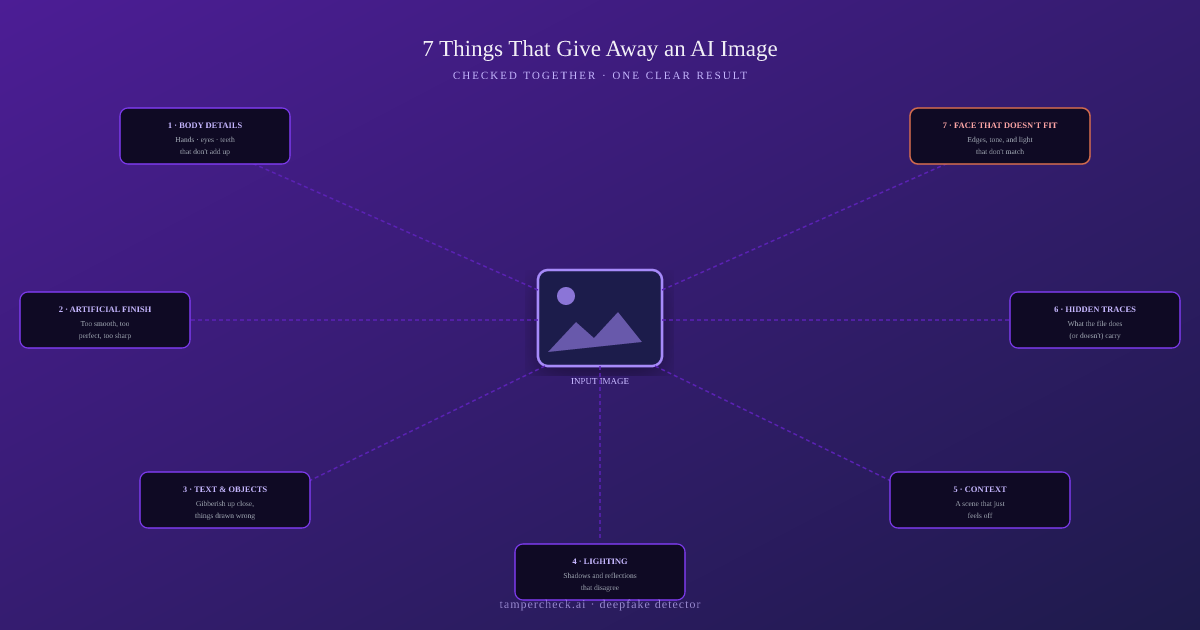
No single check on this list is proof by itself. A real photo of a real person can trip one or two of these for innocent reasons - an unusual feature, heavy compression, a busy background. That's why we never call a verdict off one weak signal. We only call an image fake when enough independent checks agree - and we say so plainly when the evidence is too thin to be sure, instead of guessing.
How TamperCheck checks all seven automatically
You upload a photo. Behind the scenes, the image runs through a set of automated checks covering everything above - texture, text, lighting, the hidden information point, and (where there's a face in the shot) the face-edge check. We deliberately don't publish exactly how each of these checks works under the hood; the moment that's public knowledge, it becomes a checklist for getting past it.
Once all the checks have run, we don't just spit out raw numbers - the result gets reviewed in the round, the same way a trained analyst would weigh several pieces of evidence together, and comes back as one of four plain results:
- Genuine - a real photo, taken by a real camera
- AI-generated - made entirely by an image generation tool
- Face-swapped - a real photo with the face digitally replaced
- Unclear - the evidence isn't strong enough either way to be confident
Every result comes with a confidence level and a short, plain-English explanation of what drove the call - not just a label with no reasoning behind it. And we'd rather tell you "unclear" than force a guess: a result only comes back as a confident "AI-generated" or "face-swapped" when more than one of the seven checks points the same way.
Why this still matters as the tools get better
AI image tools keep closing individual gaps - better hands today, better lighting tomorrow. What they're not designed to do is get every single one of these things right, in the same image, at the same time - because nobody is building an image generator to specifically beat a forensic check. They're building it to look convincing to a person glancing at it. That gap between "looks right" and "checks out on every front at once" is exactly what this kind of detection is built to use, and it's not something that closes just because one generator gets a little better.
Try the new deepfake detector
Upload any photo and get a clear result - genuine, AI-generated, or face-swapped - in about a minute. $5 free to start.
Test a fake document →FAQ
- Will this keep working as AI image generators improve?
It's an ongoing race, but checking several unrelated things at once has a real advantage: an image has to get its texture, its text, its lighting, its hidden technical traces, and (for face-swaps) its edges all right simultaneously. Generators are built to look convincing to the eye, not to pass every one of those checks together - and improving one doesn't fix the others.
- Why would it say 'unclear' instead of just giving me a yes or no?
Because a forced yes/no on weak evidence does more harm than good. We only return a confident "AI-generated" or "face-swapped" result when multiple checks agree. One ambiguous signal on its own - say, an odd hand position - comes back as "unclear" rather than risking a false accusation against a genuine photo of a real person.
- Is this the same as the deepfake check used for ID documents?
Related, but not the same thing. Deepfake document detection is built specifically for ID documents - passports, licences, utility bills - and adds document-specific checks on top, like verifying the data printed on the document is internally consistent. This image checker is the general-purpose version: selfies, photos, any image, run through the same kind of multi-check process without the document-specific layer.
- Can someone strip the hidden information to get around the check?
They can remove or fake it, which is exactly why we never treat it as proof on its own - it's one signal among seven, and a missing or altered version of it just shifts the weight onto the other six.
Run the new deepfake detector
TamperCheck.ai now checks every uploaded image against all 7 warning signs and gives you a clear result with a plain-English explanation - not just a label.
- Run a deepfake check - select Deepfake Detection mode, $5 free to start
- AI KYC - deepfake & forgery detection - the forensic layer for identity workflows
- Deepfake document fraud - the document-specific version of this check