A passport's expiry date is pushed forward by two years. A salary on a payslip moves from $58,000 to $98,000. A closing balance on a bank statement gains a zero. A revoked trade licence is reissued — on paper — with a fresh five-year validity. You can't see any of these changes. And the verification workflows most organisations still run can't catch them either.
Document tampering detection is how you prove a document wasn't issued the way it claims. It's the layer that sits between an automated approval flow and a fraudulent loan, tenancy, claim, or identity — and it works because a computer can do checks in three seconds that a human can't do at all.
This guide is written for two readers: the engineer who needs enough depth to build against it, and the ops lead who needs to evaluate a vendor. We'll keep the jargon light. By the end, you'll know what document tampering detection actually does, which signals it relies on, why human review on its own no longer works, and what a real pipeline looks like.
What is document tampering detection?
Document tampering detection is the automatic checking of a document to answer one question: has it been changed since it was issued — or was it ever really issued at all?
It is not the same as OCR, identity matching, or document classification:
- OCR reads the text. It assumes the document is real and tells you what it says.
- Identity matching compares a face or a name across documents. It doesn't ask whether the document itself is real.
- Document classification decides whether a file is a passport, a payslip, or a bill. It doesn't ask whether the passport is forged.
Document tampering detection sits underneath all three. Before you trust the salary OCR pulled out, or the name you matched against an ID, you need to know the document itself is genuine.
For a focused comparison, see Document Tampering Detection vs OCR.
The three things a detection system has to prove
A good detection system answers three independent questions:
- Does the document agree with itself? Do the values, layout, fonts, hidden metadata, and arithmetic all line up?
- Does it agree with the outside world? Does the issuer actually exist, does the template match a real example, do the documents in the bundle agree with each other?
- Does it look like something that was really issued? Or does it have the fingerprints of an editor, a generator website, or an AI image model?
Faking any one of those is cheap. Faking all three at once is hard — and that's what good detection makes a fraudster do.
Why human review on its own no longer works
Most legacy verification rests on one assumption: a trained reviewer will spot a fake. In 2026, that assumption no longer holds for the volume of fraud coming through digital channels.
- PDF editors produce edits that look identical to the original. A salary changed in Acrobat looks the same as the real thing. The clues are inside the PDF's structure, not in what you see on screen.
- AI-assisted image editors now auto-match fonts, lighting, and texture. The old giveaways — mismatched fonts, crooked text, visible cloning — are mostly gone.
- AI image models produce documents that have never existed at all. There's no original to compare to. The clues are statistical patterns in the pixels, not anything you can see.
- Volume defeats attention. A reviewer who looks at 400 payslips a day can't stay sharp enough to catch a single-character font glitch on submission 287.
Document tampering detection works because it runs checks no human can do at all — comparing fonts character by character, reading the PDF's hidden metadata, measuring pixel-level error patterns — on every single document, not just the ones you happen to spot-check.
The fraud that costs organisations the most isn't the obviously bad fake — it's a well-made tweak to a real document. That's exactly the case where human review fails and automated detection wins.
The ten checks behind document tampering detection
A real document tampering detection system runs many checks at once. No single check is enough on its own. The combination is what makes the system hard to beat.
1. Error Level Analysis (ELA)
Every time an image is saved as a JPEG or PDF, the file gets compressed. When part of the image is edited and saved again, that part is compressed differently from the rest. ELA turns those differences into a heatmap so you can see exactly where the edit happened.
Catches: local edits to photos and scans — a changed balance, a swapped name field, a pasted signature.
Limits: weaker on images that have been re-saved as a whole (a photo of a screen, a screenshot), because the whole image shares the same compression history.
2. Font and character matching
A real document is laid out in one go by the issuer's software. Every character in a column has the same spacing, weight, height, and alignment.
When someone opens a PDF, deletes a value, and types a new one in — even with the right font — the new characters never quite match. The differences are too small for the eye to catch, but a model picks them up reliably.
Catches: edits made in a PDF editor to specific values — salary figures, balances, dates, account numbers.
3. Arithmetic
Every financial document has to add up:
- Bank statements: opening balance + credits − debits = closing balance, and the running total has to chain row by row.
- Payslips: gross pay − deductions = net pay, and the deductions should match the local tax tables.
- Invoices: line items add up to the subtotal; the tax is the right rate applied to that subtotal.
Change one number and every linked number has to be recalculated too. Most fraudsters don't bother. Arithmetic is one of the strongest signals there is: the maths either adds up or it doesn't.
4. Hidden metadata
Every PDF carries a hidden record of how it was made — the software that produced it, when, whether it's been modified since, and what fonts and colour settings it uses.
A statement actually issued by a bank looks, in its metadata, like every other statement that bank issues. One produced by a "fake statement" website carries that website's fingerprint. One edited in Acrobat shows both the original producer and the later editor.
Catches: documents from generator websites, edits made after issuance, and creation dates that don't line up with what the document claims.
5. Visible vs invisible text
Real PDFs from banks and government agencies have two layers: the image you see, and an invisible text layer underneath that says exactly what's on the page. A common trick is to drop a white rectangle over the original value and type a new one on top. The invisible text layer underneath still holds the original.
Detection compares the two. If the visible value and the invisible value don't agree, the difference is the edit.
6. MRZ check digits on IDs
The two lines of code at the bottom of a passport are called the MRZ (Machine Readable Zone). They encode the document's key fields — name, date of birth, document number — along with check digits that depend on those fields.
Change the date of birth without recomputing the check digits and the MRZ no longer validates. Most fraudsters don't recompute.
Deeper dive: Fake Passport Detection — Forensic Signals.
7. Template and layout
Banks, governments, and other issuers use fixed templates. Field positions, column widths, header sizes, and logos sit in the same place every time. Layout analysis compares the submission to a library of real examples. Inserted rows, shifted fields, and other structural changes get flagged.
8. Issuer lookup
The organisation that supposedly issued the document — an employer, a utility company, a regulator, a university — should exist somewhere public. Detection looks it up: does the company exist, is it active, does its registered industry match, does the licence number show as live?
Catches: made-up employers on payslips, non-existent utilities on bills, fake institutions on credentials.
9. AI-generation detection
Documents generated by an AI image model have giveaway patterns: pixel noise that doesn't match a real camera, no real paper texture, missing depth that you'd expect from a lens. A model trained on real-vs-generated documents flags these submissions before any other check runs.
10. Cross-document agreement
When someone submits a bundle — ID + bank statement + payslip + utility bill — the documents have to agree with each other. Same name spelt the same way. Same address. The salary on the payslip should show up as deposits on the statement. The address on the bill should match the one on the statement.
Catches: fraud rings using mismatched source documents, and applicants who change one document and forget to update the rest.
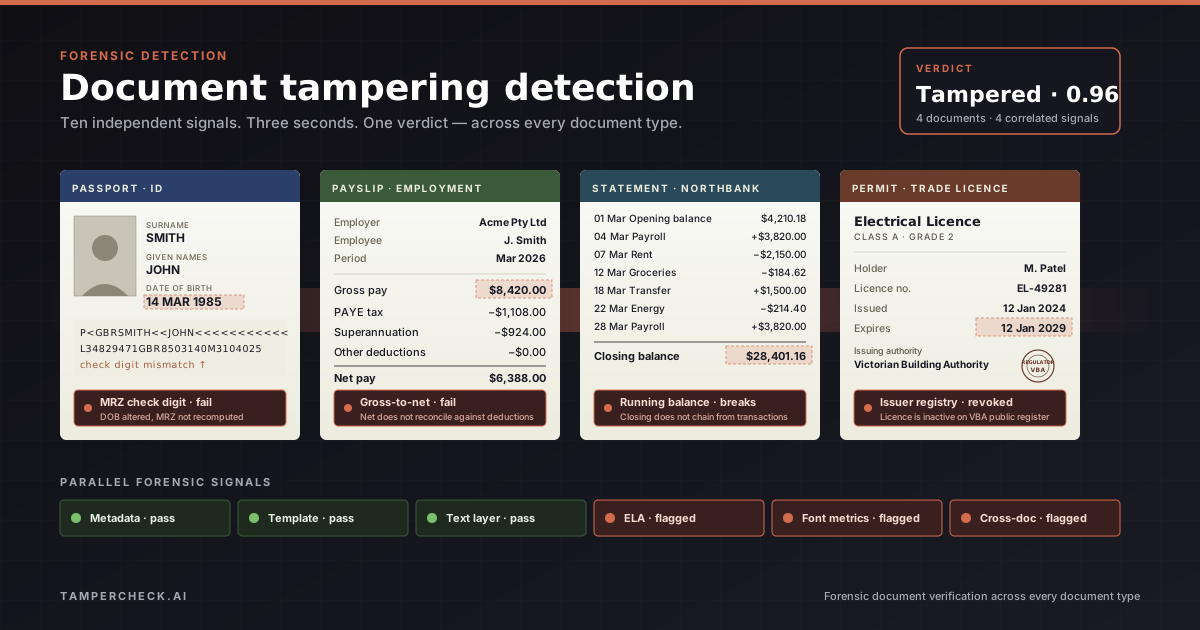
Real-world tampered documents almost always trip a cluster of signals at the same field — ELA, font matching, and a check-digit failure all pointing at the date of birth on an altered passport; ELA, font matching, and gross-to-net arithmetic all pointing at the salary on a doctored payslip; or ELA, font matching, and an issuer-registry mismatch all pointing at the expiry on a tampered permit. A single flag on its own is often just a compression quirk or an unusual-but-genuine document. Multiple flags at the same place are the giveaway.
What the output looks like
A detection system shouldn't just say "fake" or "real" — it should hand back a report a reviewer can actually use.
The example below is a verdict for a tampered trade permit. The same shape works for IDs, payslips, and bank statements; only the document type, field labels, and mix of checks change.
{
  "verdict": "tampered",
  "confidence": 0.93,
  "document_type": "trade_permit",
  "signals": [
    {
      "check": "ela_analysis",
      "result": "elevated_artefacts",
      "severity": "high",
      "confidence": 0.89,
      "region": { "field": "expiry_date", "page": 1 },
      "detail": "Compression pattern at the expiry-date field doesn't match the rest of the page — looks like a paste-over."
    },
    {
      "check": "font_metrics",
      "result": "outlier_detected",
      "severity": "medium",
      "confidence": 0.76,
      "region": { "field": "expiry_date", "page": 1 },
      "detail": "Character spacing on the expiry date is well outside the spacing used everywhere else on the page."
    },
    {
      "check": "issuer_verification",
      "result": "fail",
      "severity": "high",
      "confidence": 0.95,
      "detail": "Licence EL-49281 shows as revoked on the Victorian Building Authority's public register, but the document claims it's active."
    },
    { "check": "metadata", "result": "pass", "severity": null },
    { "check": "template_match", "result": "pass", "severity": null },
    { "check": "text_layer_diff", "result": "pass", "severity": null }
  ],
  "summary": "Two checks point at the same expiry-date field, and the issuer's own register shows the licence is revoked. The document is tampered with high confidence."
}
The shape matters as much as the verdict. If a reviewer only gets { "verdict": "tampered", "confidence": 0.93 }, all they can do is trust or distrust the system. If they get the per-check breakdown, they can review it, explain it to a manager, and back the decision up with evidence — whether the document is a permit, an ID, a payslip, or a statement.
What a real pipeline looks like
A document tampering detection pipeline isn't one model — it's a team of specialists, each responsible for one kind of check.
┌────────────────┐    ┌──────────────────┐    ┌────────────────────┐
│  Ingestion     │──▶ │  Classification  │──▶ │  Signal fan-out    │
│ (PDF, JPG, PNG │    │  (doc type +     │    │  (parallel checks) │
│  HEIC, scans)  │    │   region segm.)  │    │                    │
└────────────────┘    └──────────────────┘    └─────────┬──────────┘
                                                        │
        ┌───────────────────────────────────────────────┴───────────────────────────────────┐
        ▼                ▼              ▼                ▼               ▼                  ▼
   ┌─────────┐     ┌──────────┐   ┌──────────┐    ┌──────────┐    ┌─────────────┐   ┌──────────────┐
   │  ELA    │     │  Font    │   │  Arith.  │    │ Metadata │    │ Template /  │   │  Issuer /    │
   │ engine  │     │ metrics  │   │  checker │    │  parser  │    │ layout      │   │  AI-gen      │
   └─────────┘     └──────────┘   └──────────┘    └──────────┘    └─────────────┘   └──────────────┘
        │                │              │                │               │                  │
        └────────────────┴──────────────┴────────────────┴───────────────┴──────────────────┘
                                                │
                                                ▼
                                  ┌──────────────────────────┐
                                  │  Aggregator + verdict     │
                                  │  (correlation, severity,  │
                                  │   confidence calibration) │
                                  └──────────────────────────┘
                                                │
                                                ▼
                                  ┌──────────────────────────┐
                                  │  Structured verdict JSON  │
                                  │  + reviewer rationale     │
                                  └──────────────────────────┘
A few design choices matter:
- Run the checks in parallel, not in a chain. If one check feeds the next, a fraudster who beats the first one avoids the rest. Independent checks share no weak point.
- Say where the problem is. "ELA failed" isn't as useful as "ELA failed on the closing balance." Knowing the field is what lets you see when multiple checks point at the same place.
- Confidence scores have to mean the same thing across checks. Otherwise you can't compare a 0.7 from one detector to a 0.7 from another, and the final verdict is noise.
- Weight clusters, not single flags. Several checks at the same field is strong evidence of tampering. A single, isolated flag is usually noise.
Document tampering detection by document type
Different document types lean on different checks. A good system weights them appropriately for each one.
| Document type | Main checks |
|---|---|
| Passports & ID documents | MRZ check digits, photo-area integrity, template match, AI-generation detection |
| Employment documents (payslips, contracts, reference letters) | Gross-to-net arithmetic, year-to-date consistency, employer lookup, font matching, ELA |
| Bank statements | Balance arithmetic, running-total chain, ELA, font matching, hidden metadata |
| Permits & trade licences | Regulator register lookup, expiry-date checks, seal and template match, font matching, ELA |
| Invoices & quotes | Line-item arithmetic, tax calculation, issuer lookup, sequential numbering |
| Credentials & degrees | Institution accreditation, template match, seal analysis, font identification |
| Utility bills | Issuer lookup, date recency, address extraction, structural integrity |
| Multi-document bundles | Same name, address, employer, and salary across all documents |
For document-type deep dives, see Tampered Bank Statement Detection, Payslip Fraud Detection, and Fake Passport Detection.
Build or buy?
Every team that looks at document tampering detection eventually asks the same question: do we build this ourselves?
The honest answer depends on three things.
1. How many checks you actually need. Building one or two checks (ELA, arithmetic) is a four to eight week project. Building all ten — and keeping them sharp against fraudsters who update their tools every few months — is a permanent team. Most teams underestimate this by a long way.
2. Whether you have the reference data. Detection is much more accurate when the system has a library of real document templates and a list of real issuers to compare against. Getting, cleaning, and maintaining that data is the hard part. Without it, you're guessing.
3. How fast fraud is moving. Fraud methods keep changing. New "fake statement" websites come online. New AI image models leave new traces. A detection system that isn't retrained on fresh examples goes stale in months.
For most teams — outside the biggest banks and KYC providers — building is the wrong call. The pragmatic move is to wire a verification API into your existing workflow and let its verdict feed your existing decision logic.
Integrating into an application flow? The Document Verification API Developer Guide walks through endpoints, webhooks, and how to use the verdict.
Wiring detection into a real workflow
Detection is the easy part. What turns it into actual fraud reduction is the workflow around it.
Triage routing. Route every submission by verdict:
- Clear (high confidence, no flags) → auto-approve. Usually 60–80% of volume.
- Suspicious (mid confidence, one or two flags) → human review, with the forensic report pre-loaded.
- Tampered (high confidence against fraud) → escalate to fraud or compliance with the full breakdown.
Reviewer UI. Don't make the human redo the work the AI just did. Show the flagged fields highlighted, with the reason for each flag. A reviewer should reach a confident decision in under a minute — not spend ten minutes guessing.
Decision logging. Save the verdict alongside the application record. In regulated industries — lending, KYC, insurance — this is the audit trail that justifies the decision when someone asks later.
Feedback loop. When a reviewer overrides the verdict, that's a gold-standard label. Feed it back to retrain. Detectors without a feedback loop drift over time; detectors with one keep getting better.
For a deeper look at how AI agents run these checks behind the scenes, see AI Agent Document Fraud Detection.
Common misconceptions about document tampering detection
"If a document looks right, it's probably real." The most common kind of fraud is a real document with one or two changed values. It looks identical to the original. Eyeballing it is the wrong tool.
"OCR plus business rules will catch fraud." OCR tells you what the document says — if you trust it. Business rules ("salary must be above $40k") catch policy violations, not forgeries. A made-up salary that meets your rule sails through. Tampering detection is what tells you whether to trust the OCR'd value in the first place.
"One model can do the whole thing." Single-model approaches are good at one kind of clue and brittle against everything else. Real detection runs many checks, and the way they're combined matters as much as any one of them.
"AI-generated documents are too good to catch." They're better than they were. They still leave statistical traces. And they still have to make the arithmetic add up, match a real template, and name a real issuer — none of which AI image models do for you.
"This is only relevant to KYC." Document fraud shows up in lending, rentals, insurance claims, HR screening, vendor onboarding, school admissions, healthcare credentialing, and immigration. Anywhere a document is the basis of a high-value decision, tampering detection applies.
Where document tampering detection is heading
The next two years are likely to bring three shifts:
- LLMs as the brain, specialist models as the hands. The layer that decides which checks matter most for each document type — and that writes the human-readable explanation — is increasingly an LLM. The individual checks stay specialist.
- Detection systems will train against their own forgery generators. Teams will build fakes at scale to test whether their detectors still catch them. It's the only way to stay ahead of public forgery tools.
- Standard verdict formats. Regulators in the UK, US, and Australia are pushing toward common verdict formats, so that auditors can read reports from any vendor without translation.
The principle that won't change: no single check is enough on its own. The combination is what matters.
Try document tampering detection on a real document
Upload any PDF, image, or scan and get back a verdict in under 3 seconds. See which checks pass, which flag, and why — in plain English. $5 free to start, no key required.
Start free →Related reading
| Topic | Post |
|---|---|
| The full landscape of document fraud | Document Tampering and Fraud: The Complete Guide |
| Tampering detection vs OCR | Document Tampering Detection vs OCR |
| AI agents for forensic detection | AI Agent Document Fraud Detection |
| Bank statement tampering | Tampered Bank Statement Detection |
| Payslip and income fraud | Payslip Fraud Detection |
| Passport and ID forensics | Fake Passport Detection — Forensic Signals |
| Deepfake documents in KYC | Deepfake Document Fraud in KYC |
| Synthetic identity fraud | Synthetic Identity Fraud and Document Verification |
| Integration walkthrough | Document Verification API — Developer Guide |
Frequently Asked Questions
What is document tampering detection?
Document tampering detection is the automatic checking of a document — usually a PDF, image, or scan — to find out whether it's been changed, faked from scratch, or generated by an AI image model. It works by running several independent checks (compression patterns, font matching, arithmetic, hidden metadata, layout, issuer lookup) rather than relying on someone looking at it.
How is document tampering detection different from OCR?
OCR reads the text off a document and assumes it's real. Document tampering detection asks the question before that: was the document really issued in this form? OCR tells you what the document says; tampering detection tells you whether to believe it.
Can it catch documents edited in PDF editors?
Yes — this is exactly what it's built for. Edits in PDF editors like Acrobat or Foxit leave traces in the file's structure: shifted character spacing, changed compression patterns, altered hidden timestamps, and mismatches between the visible text and the hidden text layer. Detection picks these up even when the edit is invisible to the eye.
How accurate is AI-based document tampering detection?
It depends on the document type and how much reference data the system has. On well-covered types — passports from major countries, standard bank statement formats, common payslip layouts — accuracy is high. Just as important: a good system hands back a breakdown of each check, so any decision can be reviewed and defended.
Does it work on photographed or scanned documents?
Yes. Image-based checks (ELA, AI-generation detection, lighting, edge artefacts) work on photos and scans. PDF-only checks like the visible-vs-hidden text comparison don't apply to images, so the system runs the right set of checks for each file type.
How fast is it in practice?
A well-built pipeline returns a verdict in around three seconds per document, with all checks running in parallel. That's fast enough to sit inline in an onboarding or application flow — not as a slow batch job that runs overnight.
Do I need to build this in-house?
For most organisations, no. Building one or two checks is doable; building and maintaining all ten — against fraudsters who update their tools every few months — is a permanent investment in models, data, and a template library. The pragmatic path is to integrate a verification API and use its verdict in your existing workflow.
What document types can be checked?
Most common types: bank statements, payslips, invoices, quotes, passports, driver's licences, national IDs, utility bills, professional credentials, academic certificates, trade permits, insurance documents, and more — across most major issuing countries. Coverage is widest on common documents from major economies and narrower on rarely-seen formats.