When companies say they "verify documents automatically," they usually mean one of two very different things. Some mean they extract the text from documents using OCR and compare it against a database. Others mean they run forensic analysis to determine whether the document is genuine.
The first tells you what the document says. The second tells you whether it's telling the truth.
Confusing these two capabilities is one of the most expensive mistakes in automated document workflows.
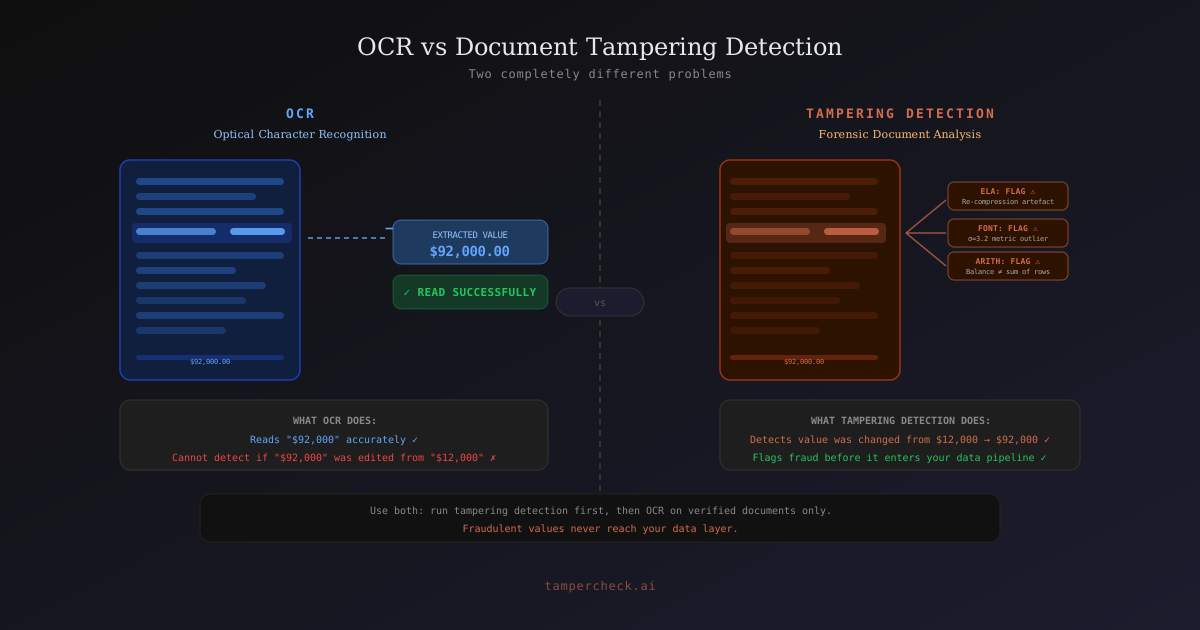
What OCR Does (and Doesn't Do)
Optical Character Recognition extracts text from images and PDFs. A well-implemented OCR pipeline can:
- Read names, dates, amounts, and addresses from a scanned document
- Extract MRZ data from a passport image
- Pull transaction rows from a bank statement photo
- Compare extracted values against a reference database
What OCR cannot do:
- Determine whether an extracted value was present in the original document or was pasted in later
- Detect that a balance figure was changed from $52,000 to $92,000
- Identify that a photo was substituted in an identity document
- Distinguish between a genuine PDF generated by a bank and a PDF created by a fake bank statement tool
A fraudster submitting an altered bank statement with a $92,000 closing balance passes OCR-based verification perfectly: the OCR reads the value accurately. The fraud is invisible to OCR because OCR doesn't care whether the value is genuine.
What Document Tampering Detection Does
Document tampering detection analyses whether the document's content is forensically consistent with a genuine document from the claimed source. It operates on multiple layers simultaneously:
Pixel layer: ELA detects where the image has been re-compressed after editing. Font metric analysis finds statistically anomalous character rendering. Clone detection identifies copy-pasted regions.
Structure layer: arithmetic verification checks that all computed values (balances, totals, deductions) are internally consistent. Layout analysis verifies that rows and columns match the expected template.
Metadata layer: PDF creation timestamps, software identifiers, and modification history are cross-referenced against the claimed document origin.
Semantic layer: an LLM reasons about the document's content for plausibility: whether the stated employer exists, whether the salary figure is consistent with stated deductions, whether the document's narrative is internally coherent.
None of these checks are available to OCR. OCR doesn't see compression artefacts, font metrics, or metadata; it sees only the extracted text.
The Three Failure Modes of OCR-Only Verification
Failure Mode 1: The Inflated Value
An applicant changes the closing balance on their bank statement from $12,000 to $52,000. The document otherwise looks genuine: same layout, same font, same bank logo.
OCR output: "closing balance: $52,000" → matches requirement → passes
Tampering detection output: ELA anomaly at closing balance field, font metrics outlier, running balance chain broken → "suspicious"
Failure Mode 2: The Inserted Row
A fraudster adds a $5,000 salary deposit to their bank statement between two genuine transactions. The row looks authentic: correct font, correct date format, plausible description.
OCR output: reads all rows including the inserted one, totals match the (now incorrect) running balance → passes
Tampering detection output: column alignment variance in inserted row, running balance chain broken, ELA artefact at row boundary → "likely tampered"
Failure Mode 3: The AI-Generated Document
An applicant submits a bank statement generated entirely by a generative AI tool — never a genuine document, never from a real bank.
OCR output: reads all fields, values appear plausible → passes
Tampering detection output: AI generation signature in pixel noise, PDF creator metadata identifies a web-based generator, no text-layer-to-visual consistency (no text layer at all) → "likely tampered"
Where OCR Adds Value in a Verification Pipeline
OCR and tampering detection are complementary, not competing. OCR provides the extracted data that feeds downstream processes:
- Identity matching: OCR extracts the name from an identity document, which is compared against the name on a bank account or application form
- Address verification: OCR extracts the address from a utility bill for comparison against the applicant's stated address
- Data entry automation: OCR eliminates manual data transcription from submitted documents into a CRM or workflow system
The key is understanding what problem each tool solves:
| Task | OCR | Tampering Detection |
|---|---|---|
| Extract name from passport | ✓ | · |
| Verify passport hasn't been altered | · | ✓ |
| Read balance from bank statement | ✓ | · |
| Verify balance hasn't been edited | · | ✓ |
| Auto-fill application form from payslip | ✓ | · |
| Verify payslip is genuine | · | ✓ |
| Flag AI-generated documents | · | ✓ |
The Pipeline Design
A production document verification workflow combines both capabilities in sequence:
1. Document submitted
2. Tampering detection forensics (3s)
   → Verdict: clear / suspicious / likely tampered
3. If clear or suspicious-but-proceeding:
   → OCR data extraction
   → Extracted data fed to downstream systems
4. If likely tampered:
   → Escalate before proceeding
Running tampering detection first ensures that OCR is only applied to documents that have passed a basic authenticity check. This prevents extracted fraudulent values from entering your data systems even as "suspicious" records.
Many fraud workflows have downstream data systems that treat any extracted value as implicitly trusted. Running tampering detection before OCR extraction closes this gap: fraudulent values never make it into the data layer.
Practical Implications for Different Industries
Lending and mortgages: OCR extracts salary and balance figures for credit assessment. Tampering detection ensures those figures are genuine before they inform a credit decision.
KYC and onboarding: OCR extracts identity data for matching and watchlist checks. Tampering detection ensures the underlying documents haven't been altered.
Insurance claims: OCR extracts claim amounts and dates for claims processing. Tampering detection verifies the supporting invoices and reports are genuine.
HR and employment screening: OCR extracts qualification details for background verification. Tampering detection verifies the certificates are authentic.
In every case, the right architecture runs tampering detection first, then uses OCR to extract data from verified documents.
Add tampering detection to your document pipeline
Run forensic verification in under 3 seconds before your OCR step. $5 free credits to start.
Start free →FAQ
- Can OCR software detect forgeries?
Standard OCR tools cannot detect document forgeries — they extract text regardless of whether it's genuine. Some enterprise OCR platforms include basic template matching or field validation, but these are distinct from forensic tampering detection and significantly less capable.
- Is document tampering detection the same as liveness detection?
No. Liveness detection verifies that a person submitting an identity document is physically present and alive (not a photo of a photo). Document tampering detection verifies that the document is genuine. Both are needed for full identity verification; they address different fraud vectors.
- How do I know if my current document workflow uses OCR or tampering detection?
Ask your document processing vendor: "What happens if I submit a bank statement with the closing balance manually edited in Adobe Acrobat?" If the system doesn't flag it, you have OCR — not tampering detection.
- Which industries are most exposed to the gap between OCR and tampering detection?
Financial services (lending, mortgages), insurance (claims processing), property (rental applications), and KYC-regulated businesses are all high-exposure. Any workflow that trusts extracted document data without verifying document integrity first has this gap. See how the problem shows up in practice: Tampered Bank Statement Detection, Insurance Claim Document Fraud, and Automated KYC Document Verification.
- Is there a definitive reference on what document tampering detection actually checks?
Yes. The Complete Guide to Document Tampering and Fraud covers all 10 forensic signals, the three categories of document fraud, and the industries most exposed, with a full checklist by document type.